
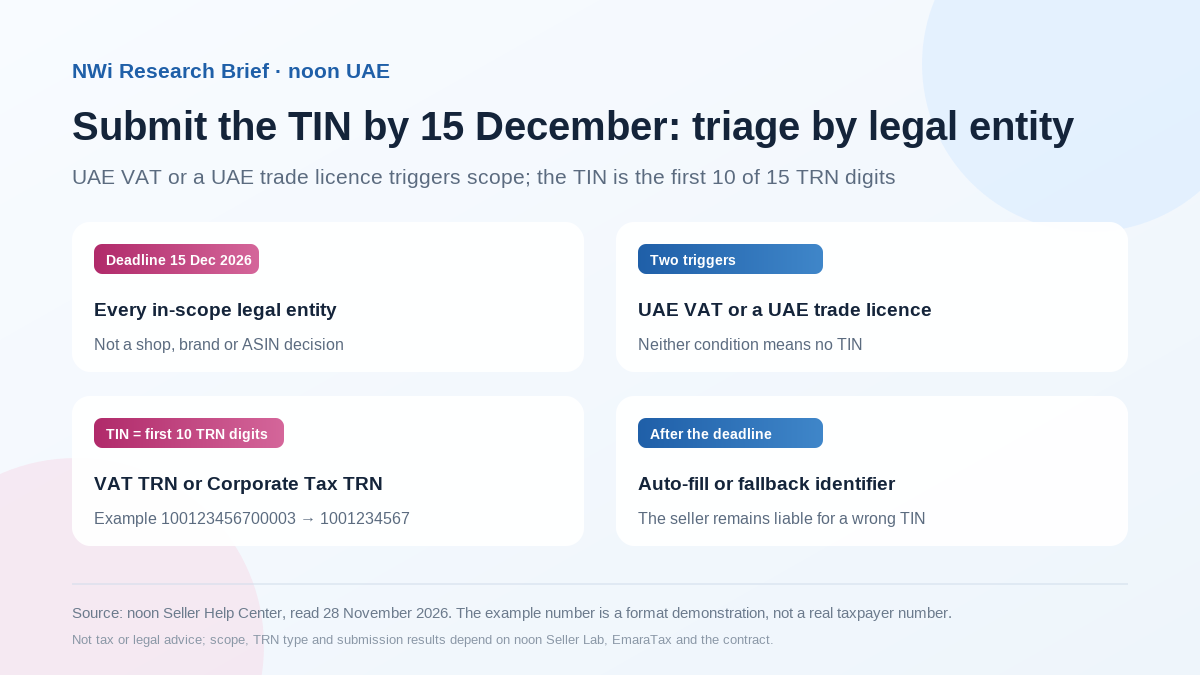
This requirement is not assessed by shop, brand or ASIN. It is assessed for each legal entity you use on noon. An entity needs a TIN if it meets either of two conditions: it is registered for VAT in the UAE, or it holds a UAE trade licence. An entity that meets neither condition does not need one. The TIN is not a new tax number; it is the first 10 digits of the existing 15-digit TRN. VAT-registered entities use the VAT TRN; non-VAT entities with a UAE trade licence use the Corporate Tax TRN. The deadline is 15 December 2026. This article answers three questions: what happens after the deadline, where the TIN comes from, and how to split multiple entities.
Who must submit: two triggers, assessed per legal entity
noon lists two triggers: the legal entity is registered for VAT in the UAE, or it holds a UAE trade licence. Either condition puts it in scope; an entity with neither does not need a TIN. The order matters: first check whether the entity holds a UAE trade licence, then whether it has UAE VAT registration. A foreign company registration (CR) is not a trigger by itself; it enters scope only when it also carries UAE VAT registration.
| Legal entity | UAE VAT registration | TIN required? |
|---|---|---|
| UAE trade licence | Yes | Yes |
| UAE trade licence | No | Yes |
| CR outside the UAE (e.g., KSA, China) | Yes | Yes |
| CR outside the UAE (e.g., KSA, China) | No | No |
The second row is the one most often misread: An entity with a UAE trade licence but no VAT registration still needs a TIN. Rows three and four show that a foreign company enters scope only when it is VAT-registered in the UAE; with neither UAE VAT nor a UAE trade licence, it does not submit.
Multiple entities are assessed separately. noon says each legal entity is evaluated independently; you must provide a TIN for every entity in scope and skip the ones that are not. Do not treat a shop, a brand, a group or a payout account as one entity.
Where the TIN comes from: the first 10 digits of a 15-digit TRN
The TIN is not a new registration. noon says a VAT-registered entity's TIN is the first 10 digits of its 15-digit VAT TRN. A non-VAT entity with a UAE trade licence uses the first 10 digits of the 15-digit Corporate Tax TRN, which can be found in the EmaraTax portal.
Format example: TRN 100123456700003 becomes TIN 1001234567. The number only demonstrates the truncation rule; it is not a real taxpayer number. You can reproduce it with your own 15-digit TRN: take 10 digits from the left; digits 11 to 15 do not enter the TIN.
The tax group is the exception. noon writes 'except where your entity is part of a tax group' but does not give an alternative formula for a tax-group entity. This article does not guess; a tax-group entity should confirm with a tax adviser or the tax authority before submitting.
Seller Lab suggests a TIN in a popup. noon says the seller must verify its accuracy and is liable for any compliance issue caused by an incorrect TIN. A suggestion is not proof. If the suggestion does not match the first 10 digits of the TRN, find out why before confirming.
How to submit before 15 December: two Seller Lab paths
The first path is the login popup. Every time you log in to Seller Lab, the popup asks for the TIN until the information is saved. If no TIN is shown, enter the 10-digit TIN and click Confirm TIN. If a suggested TIN is shown, check it digit by digit, mark whether it is correct, and confirm.
The second path is Store Management. Go to Store Management > Legal, select the legal entity you use on noon, open Tax Details, click the edit icon next to the VAT details, enter the 10-digit TIN in the Tax Identification Number (TIN) field and save.
Two details are easy to miss. First, if the legal entity is rejected, you cannot change the existing tax details; you must add new tax details to update the TIN. Second, the TIN field may look optional, but it is mandatory when the entity is in scope; do not skip it because the interface has no asterisk.
Repeat for every entity: enter Legal, select the entity, and confirm Tax Details. Do not use one entity's TIN for another, and do not treat a group tax number as every entity's TIN.
What happens after the deadline: auto-fill and the fallback identifier
Sellers with a UAE TRN: noon automatically uses the first 10 digits of the existing TRN as the TIN. The seller remains responsible for accuracy and liable for issues caused by an incorrect TIN. Sellers without a UAE TRN: noon issues e-invoices with a standard fallback identifier showing that the business is not yet registered on the UAE e-invoicing network.
noon's page does not state a penalty amount, a suspension rule, a deduction or an account penalty. This article does not add those numbers. The stated consequences are auto-fill or the fallback identifier, plus the page's warning about invoicing disruptions or compliance issues.
Doing nothing is not automatically a violation: if noon's auto-filled TIN is correct, the result may still be compliant. But if the suggestion is wrong, or the entity is in a tax group, leaving it to auto-fill hands accuracy to the system.
Keep noon's 15 December operational deadline separate from the UAE's statutory e-invoicing phase dates. This article uses only noon's 15 December date. The MoF/FTA text was not directly readable in this run, so the article does not use the statutory phase dates and does not describe 15 December as a statutory effective date.
Counter-cases: who may not need a TIN, and who should not submit blindly
Counter-case 1: a foreign entity with neither UAE VAT registration nor a UAE trade licence. It meets neither trigger and does not submit. If it later registers for UAE VAT or obtains a UAE trade licence, it enters scope and must be reassessed.
Counter-case 2: an entity with a UAE trade licence but no VAT registration. It is still in scope, but the TIN comes from the Corporate Tax TRN, not a VAT TRN. Do not submit a VAT number that does not exist, and do not mix the two.
Counter-case 3: an entity registered for UAE VAT whose trade licence is outside the UAE. VAT registration alone triggers scope; do not skip it because the licence is foreign.
Counter-case 4: an entity in a tax group. The tax group is the exception noon names; do not simply truncate the 15-digit TRN to 10 digits. Confirm the tax-group rule first.
Counter-case 5: noon's auto-filled TIN happens to be correct. Doing nothing may still be compliant, but the seller remains responsible for accuracy; 'the system filled it' is not the same as 'I checked it'.
Counter-case 6: the suggested TIN looks like yours, so you confirm it. A wrong TIN can be harder to fix than the fallback identifier; recompute the first 10 digits from the 15-digit TRN before confirming.
Counter-case 7: treating 15 December as the statutory effective date of UAE e-invoicing. 15 December is noon's operational deadline; the statutory phase dates, ASP appointment and B2C exemption are outside this article's evidence.
Worked analysis: three legal-entity scenarios
Every entity count, time estimate, TRN and registration status below is an assumption, not a measurement by noon, NWi or any seller. The arithmetic is limited to the four operations and the truncation rule; the purpose is to show how scope and TIN derivation work.
Scenario A: 4 legal entities, 2 in scope
Assume the seller uses four legal entities on noon; two hold a UAE trade licence or are registered for UAE VAT, and two hold only a foreign registration with no UAE VAT; each TIN confirmation takes 15 minutes; all figures are assumptions. Two TINs are required; the confirmation work is about 2 x 15 = 30 minutes; the other two entities are out of scope and should be skipped. Submitting all four would add about 30 minutes and could create a wrong tax number for an out-of-scope entity. First list the four entities, then process only the two in scope; record the reason for the two out of scope and do not submit a placeholder TIN.
Scenario B: UAE trade licence, no VAT registration
Assume one legal entity holds a UAE trade licence but is not registered for UAE VAT; assume its Corporate Tax TRN is 100123456700003; no statutory e-invoicing phase date is used; all figures are assumptions. The entity is still in noon's TIN scope because the UAE trade licence alone triggers it; The TIN is the first 10 digits of the Corporate Tax TRN, 1001234567; it cannot submit a VAT TRN that does not exist; the deadline is still 15 December 2026. Check the 15-digit Corporate Tax TRN in EmaraTax first, then truncate to 10 digits, compare with the Seller Lab suggestion and submit; do not use a VAT TRN or invent a number.
Scenario C: foreign entity, no UAE VAT and no UAE trade licence
Assume a foreign legal entity sells only B2C on noon, has no UAE VAT registration and no UAE trade licence, and does not plan to change its registration status before 15 December 2026; all figures are assumptions. The entity meets neither noon trigger and does not submit a TIN; if it later registers for UAE VAT or obtains a trade licence, it enters scope and must be reassessed; before that change, submitting an invented TIN has no compliance value. Record why it is out of scope and the review date; when the registration status changes, run the entity table again and do not reuse the old conclusion.
| Scenario | Trigger | TIN source | Conclusion |
|---|---|---|---|
| A: 4 entities, 2 in scope | 2 hold UAE VAT or a trade licence | First 10 digits of each 15-digit TRN | Submit 2; skip 2 |
| B: trade licence, no VAT | UAE trade licence | First 10 digits of the Corporate Tax TRN | Still submit; not a VAT TRN |
| C: foreign entity, no UAE VAT or licence | Neither trigger | None | No submission; reassess after a registration change |
Action order and stop conditions
The order matters: list entities, set scope, obtain the TRN, truncate to 10 digits, check the suggestion, then submit and keep evidence.
- 1. List entities: every legal entity used on noon, its registration country, UAE VAT status and UAE trade licence status.
- 2. Set scope: apply the two triggers to each entity; do not merge by shop, brand or group.
- 3. Obtain the TRN: VAT entities use the 15-digit VAT TRN; non-VAT entities with a trade licence use the 15-digit Corporate Tax TRN from EmaraTax.
- 4. Truncate: take the first 10 digits; a tax-group entity confirms the exception first and does not truncate directly.
- 5. Check the suggestion: verify each digit of the Seller Lab suggested TIN; the seller is liable for a wrong TIN.
- 6. Submit and record: use the popup or Store Management > Legal > Tax Details; record who submitted, when, for which entity and which TIN.
- 7. Verify: use an invoice or statement to check that the TIN appears as expected; keep the screenshot or file.
- 8. Review: finish before 15 December 2026; if noon updates the page, re-read it before submitting.
Stop conditions: if the entity is out of scope, do not submit; if a tax group or the TIN is uncertain, do not confirm and ask a tax adviser or EmaraTax; if the suggestion does not match the first 10 digits of the TRN, do not confirm and find the difference; if the entity is rejected, add new tax details through noon's flow instead of repeatedly editing the old ones; if the page changes, follow the latest noon page and do not use this article as a substitute.
Fields to observe: legal entity name, registration country, UAE VAT status, VAT TRN, UAE trade licence status, Corporate Tax TRN, 15-digit TRN, computed 10-digit TIN, Seller Lab suggestion, submission time, confirmer, TIN on an invoice or statement, tax-group status, and the mapping between the noon account and the entity.
Evidence boundary, limitations and conclusion
The core facts come from two official noon Seller Help Center pages: the UAE e-Invoicing TIN page updated on 28 November 2026, and the non-VAT registered seller page. Both are noon's own operating documents, not independent confirmation by a regulator or independent media.
The UAE Ministry of Finance (MoF) and Federal Tax Authority (FTA) e-invoicing guidelines and ministerial decision timed out on direct read, so this article does not use statutory phase dates, ASP appointment dates or the statutory B2C exemption. It uses only noon's 15 December operational deadline.
noon's page does not state a penalty amount, a suspension rule, the specific effect of an invoicing disruption or an alternative TIN formula for a tax group; those are unknowns. This article also has no noon market, store, product or invoice data; noon is not in the checked product coverage list.
noon's page also says B2B invoices need the buyer's TIN; this article covers only the seller's own TIN submission to noon, not collecting, validating or updating buyer TINs.
For a seller on noon UAE, 15 December is not a date to leave to automatic processing. Build an entity-level scope table, obtain the correct TRN under the VAT/trade-licence path, truncate to the first 10 digits and check the Seller Lab suggestion; submit the in-scope entities before the deadline and record why the out-of-scope entities are skipped. A tax group, a mismatch in the suggestion or a change in registration status is a signal to stop and recheck.
The article's original contribution is to turn 'who must submit' into a legal-entity scope table and put TIN truncation, the VAT/Corporate Tax TRN split, Seller Lab submission and the late-submission consequences on one checklist.
If you operate in the UAE across several platforms and want category, price-band and competitor context from covered platforms, see NWi CrossborderGo; to discuss data scope by site, category and brand, contact us through Request a demo. noon is not in the checked product coverage list, and this article does not provide noon market data.
Data basis: on 28 November 2026 this article re-read noon Seller Help Center's 'UAE e-Invoicing: Who needs a TIN and how to add it' (page metadata datePublished 2026-11-23 and dateModified 2026-11-28) and 'How can I sell on noon as a non-VAT registered seller?'. The first page supplies the 15 December 2026 deadline, the two scope triggers, the four-row entity table, the TIN as the first 10 digits of a 15-digit TRN, the VAT TRN versus Corporate Tax TRN split, the two Seller Lab submission paths, the late-submission auto-fill/fallback consequences and the tax-group exception; the second page only confirms that a non-VAT seller with a valid local trade licence can sell on noon and does not independently prove the deadline. The UAE MoF/FTA e-invoicing guidelines and ministerial decision timed out on direct read, so this article does not use statutory phase dates, ASP dates or the B2C exemption. Calculations: the TIN is the first 10 digits of a 15-digit TRN, with 100123456700003 shown as 1001234567; the entity counts, 15 minutes per entity, TRN example and registration status in the scenarios are labelled assumptions, not measurements by noon, NWi or any seller. Product scope: noon is not in the checked product coverage list; NWi CrossborderGo does not provide noon market, store, product or invoice data, and actual coverage, sites, history and fields depend on /product/ and the contract.
This article was prepared with automated research assistance from the public sources listed at the end and has not been manually reviewed; it does not invent client data, expert review, noon seller counts, penalty amounts, invoicing disruptions or ranking results. It is not tax, legal, compliance or platform-operations advice; TIN scope, TRN type, tax-group treatment, submission results and invoice validity should be confirmed against noon Seller Lab, EmaraTax, the UAE MoF/FTA texts, the contract and professional advice.
- 1. noon Seller Help Center, published 23 November 2026 and updated 28 November 2026, UAE e-Invoicing: Who needs a TIN and how to add it: 10-digit TIN by 15 December 2026; two triggers; four-row entity table; first 10 digits of the VAT TRN or Corporate Tax TRN; two Seller Lab paths; auto-fill or fallback identifier after the deadline; read on 28 November 2026.
- 2. noon Seller Help Center, published 22 April 2026 and updated 28 November 2026, How can I sell on noon as a non-VAT registered seller?: a non-VAT seller with a valid local trade licence can sell on noon, with tax details attached to a legal entity; read on 28 November 2026.